Video player instantiation input
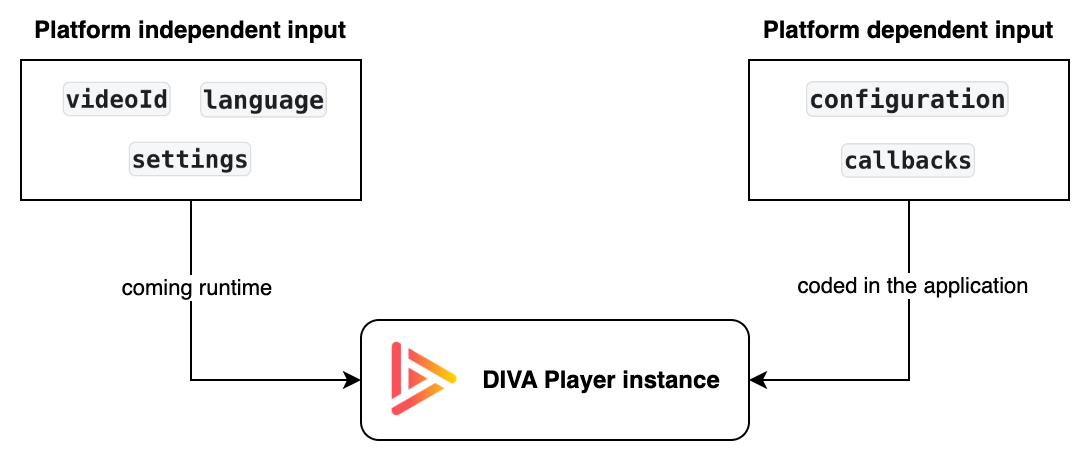
When creating a new instance of the video player, you need to feed it with two input categories:
- Platform-independent input:
videoId,language, andsettings,- Regardless of platform and for all instances, they globally determine the video player behavior.
- They can change runtime without impacting the configuration.
- Platform-dependent input:
configurationandcallbacks,- For a specific video streaming on a specific platform, they determine the video player behavior.
- They are coded when integrating the video player SDK into the hosting application — unlike the platform-independent input,
configurationandcallbackscannot change runtime.
Platform-independent input
videoId
Within the video CMS context, the unique identifier of the video the video player instance streams.
language
Selected language for the video player UI.
settings
JSON file that defines (find details in the settings article):
- Video player behaviors
- General settings
- Media analytics settings
dictionary
- Video playback behaviors
videoMetadata- ssai settings
- entitlement settings
- Data sources
Platform-dependent input
configuration
Platform-specific video player instance configuration. Find detailed description in the 'Configuration' article under platform-specific sections.
callbacks
Platform-specific video player instance callbacks. Find detailed description in the 'Callbacks' article under platform-specific sections.