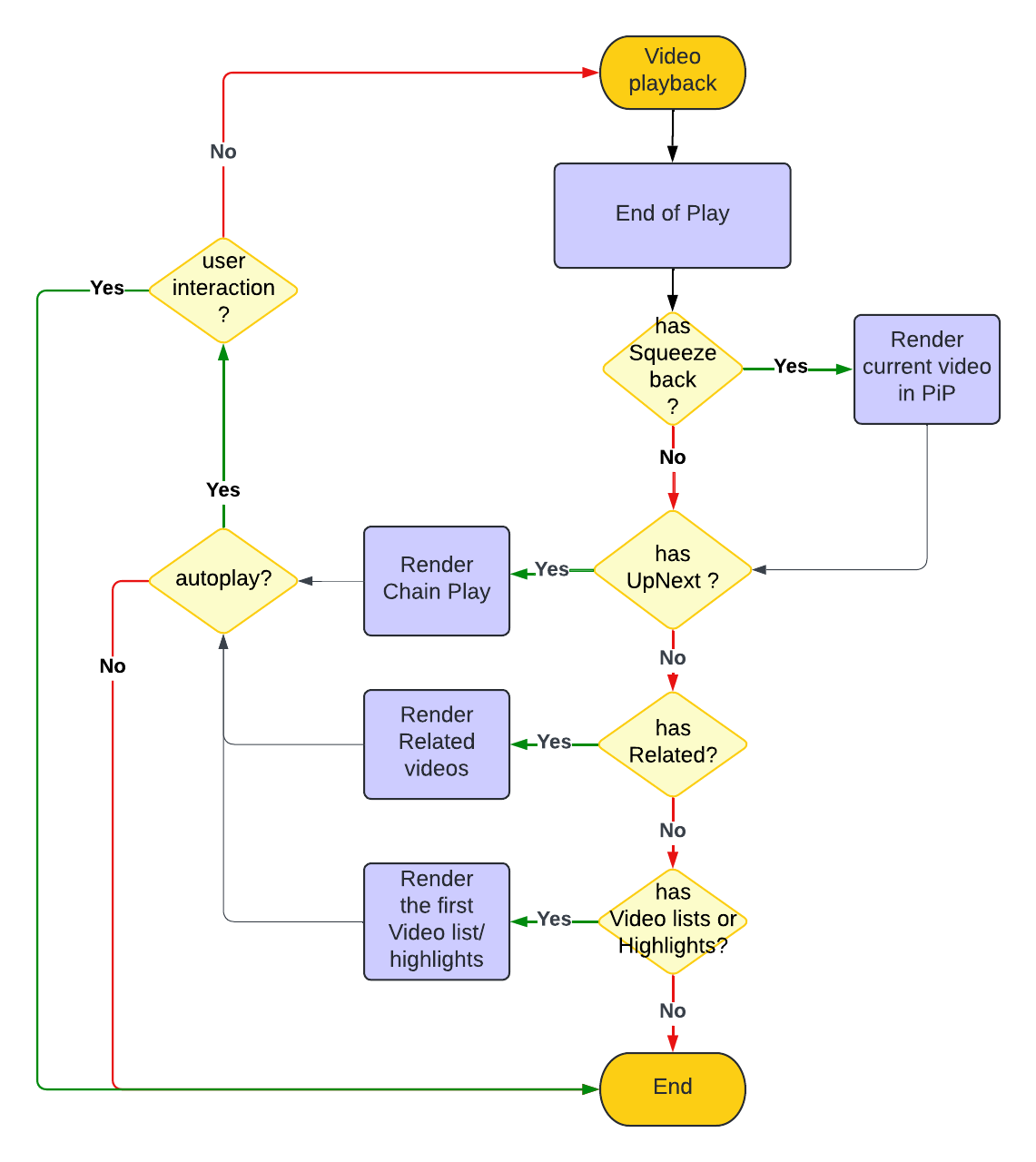
End of play
What you learn
You're instantiating DIVA Player in your web front-end and relying on third party video streaming source.
The goal of this article is to build the simplest front-end to stream a video from third party video production with, at the end, some additional content.
Before starting
-
Ensure the your video production you rely on is up and running.
-
Set the videoId and the related setting configuration.
-
According to your End-of-Play experience, ensure the VideoMetadata contains the End-of-Play properties for:
-
Ensure the VideoMetadata contains the endOfPlay properties.
Instantiation
Write the Basic instantiation code. There's no additional code to write, unless you need to overwrite the autoplay behavior that the VideoMetadata contains.
End of play configuration
Write the App() function to read the VideoMetadata as in the following example, and set the endOfPlay properties:
{
  "countdownToAutoplay": <number> //milliseconds, default 10000, 0 or negative means disabled,
  "timeToDisableAutoplay": <number> //milliseconds, default 5400000, 0 or negative means disabled,
}
Working sample code (.tsx)
- RW
- WebTV
// DIVA Player SDK
import { DivaWebComponent } from "@deltatre-vxp/diva-sdk/diva-web-sdk";
import type { DivaConfiguration, VideoMetadata, VideoMetadataClean } from "@deltatre-vxp/diva-sdk/diva-web-sdk";
// Import SDK style
import "@deltatre-vxp/diva-sdk/diva-web-sdk/index.min.css";

const libs = {
  mux: "https://cdnjs.cloudflare.com/ajax/libs/mux.js/6.2.0/mux.min.js",
  shaka: "https://ajax.googleapis.com/ajax/libs/shaka-player/4.16.15/shaka-player.compiled.js",
  hlsJs: "https://cdn.jsdelivr.net/npm/hls.js@1.5.7",
  googleIMA: 'https://imasdk.googleapis.com/js/sdkloader/ima3.js',
  googleDAI: 'https://imasdk.googleapis.com/js/sdkloader/ima3_dai.js',
  googleCast: 'https://www.gstatic.com/cv/js/sender/v1/cast_sender.js?loadCastFramework=1',
  threeJs: 'https://cdnjs.cloudflare.com/ajax/libs/three.js/0.148.0/three.min.js',
};

const config: DivaConfiguration = {
  videoId: "<video id>",
  libs: libs,
  setting: {
    general: {
      culture: 'en-GB',
      timeToDisableAutoplay: 5400000,
    }
  },
  dictionary: {
  messages: {},
  },
  videoMetadataProvider: async (
    videoId: string,
    currentVideoMetadata?: VideoMetadataClean,
    playbackState?: {
      chromecast?: boolean | undefined;
    }): Promise<VideoMetadata> => {
    return {
      "title": "Video Title",
      "sources": [
        {
        "uri": "<stream URL>",
        "format": "HLS"
        }
      ],
      "videoId": "<video id>",
      "behavior": {
        "endOfPlay": {
          "countdownToAutoplay": 10000 //milliseconds, default 10000, 0 or negative means disabled
        }
      },
      "videoLists": [
        {
          "feedUrl": "<URL to videolist xml feed>",
          "highlightColor": "0x00ff00",
          "highlightColorLight": "0x0000ff",
          "message": "Watch today's matches",
          "messageNoVideo": "No video available at the moment",
          "id": "SWITCH",
          "menu": "diva_switch"
        },
      ]
    }
  },
};

export const App = () => {
  return <DivaWebComponent config={config} />;
};
// DIVA Standalone SDK
import { DivaWebTV } from "@deltatre-vxp/diva-sdk/diva-webtv-sdk";
import type {
  DivaWebTVInitType,
  DivaWebTVProps,
  VideoMetadata,
  VideoMetadataClean
} from "@deltatre-vxp/diva-sdk/diva-webtv-sdk";

// Import SDK style
import "@deltatre-vxp/diva-sdk/diva-webtv-sdk/index.min.css";

const init: DivaWebTVInitType = {
  setting: {
    general: {
      culture: "en-GB",
      timeToDisableAutoplay: 5400000,
    }
  },
  videoId: "<video id>"
};

const libs = {
  mux: "https://cdnjs.cloudflare.com/ajax/libs/mux.js/6.2.0/mux.min.js",
  shaka: "https://ajax.googleapis.com/ajax/libs/shaka-player/4.16.15/shaka-player.compiled.js",
  hlsJs: "https://cdn.jsdelivr.net/npm/hls.js@1.5.7",
  googleIMA: 'https://imasdk.googleapis.com/js/sdkloader/ima3.js',
  googleDAI: 'https://imasdk.googleapis.com/js/sdkloader/ima3_dai.js',
};

const props: DivaWebTVProps = {
  init,
  libs,
  dictionary: {
    messages: {},
  },
  videoMetadataProvider: async (
    videoId: string,
    currentVideoMetadata?: VideoMetadataClean,
    playbackState?: {
      chromecast?: boolean | undefined;
    }): Promise<VideoMetadata> => {
    return {
      "title": "Video Title",
      "sources": [
        {
        "uri": "<stream URL>",
        "format": "HLS"
        }
      ],
      "videoId": "<video id>",
      "behavior": {
        "endOfPlay": {
          "countdownToAutoplay": 10000
        }
      },
      "videoLists": [
        {
          "feedUrl": "<URL to videolist xml feed>",
          "highlightColor": "0x00ff00",
          "highlightColorLight": "0x0000ff",
          "message": "Watch today's matches",
          "messageNoVideo": "No video available at the moment",
          "id": "SWITCH",
          "menu": "diva_switch"
        },
      ]
    }
  },
};


export const App = () => {
  return <DivaWebTV {...props} />;
}