End of play
What you learn
You're instantiating DIVA Player in your app and relying on DIVA Back Office as the video streaming source.
The goal of this article is to build the simplest front-end to stream a video from the DIVA Back Office with, at the end, some additional content.
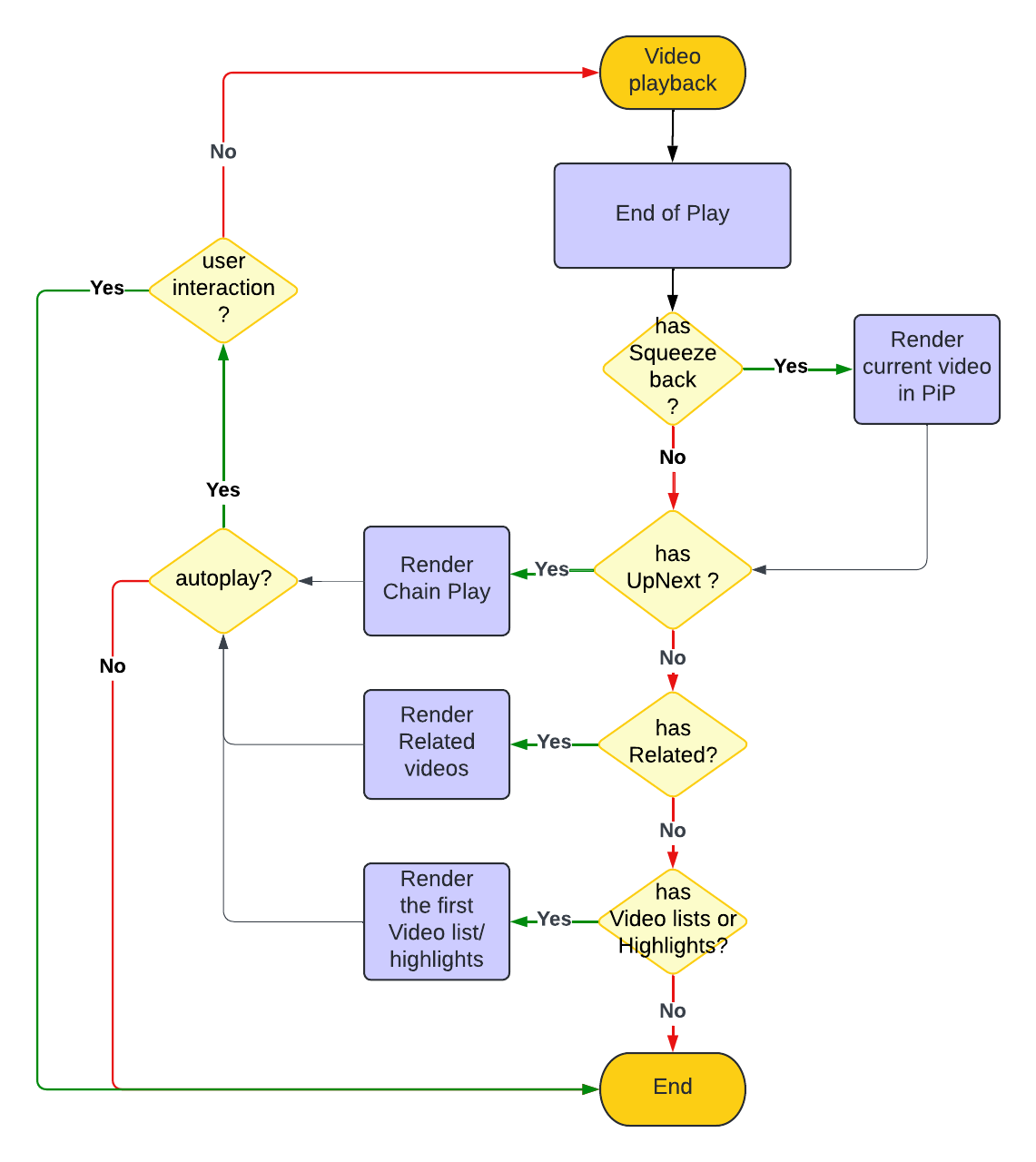
- Portrait mode
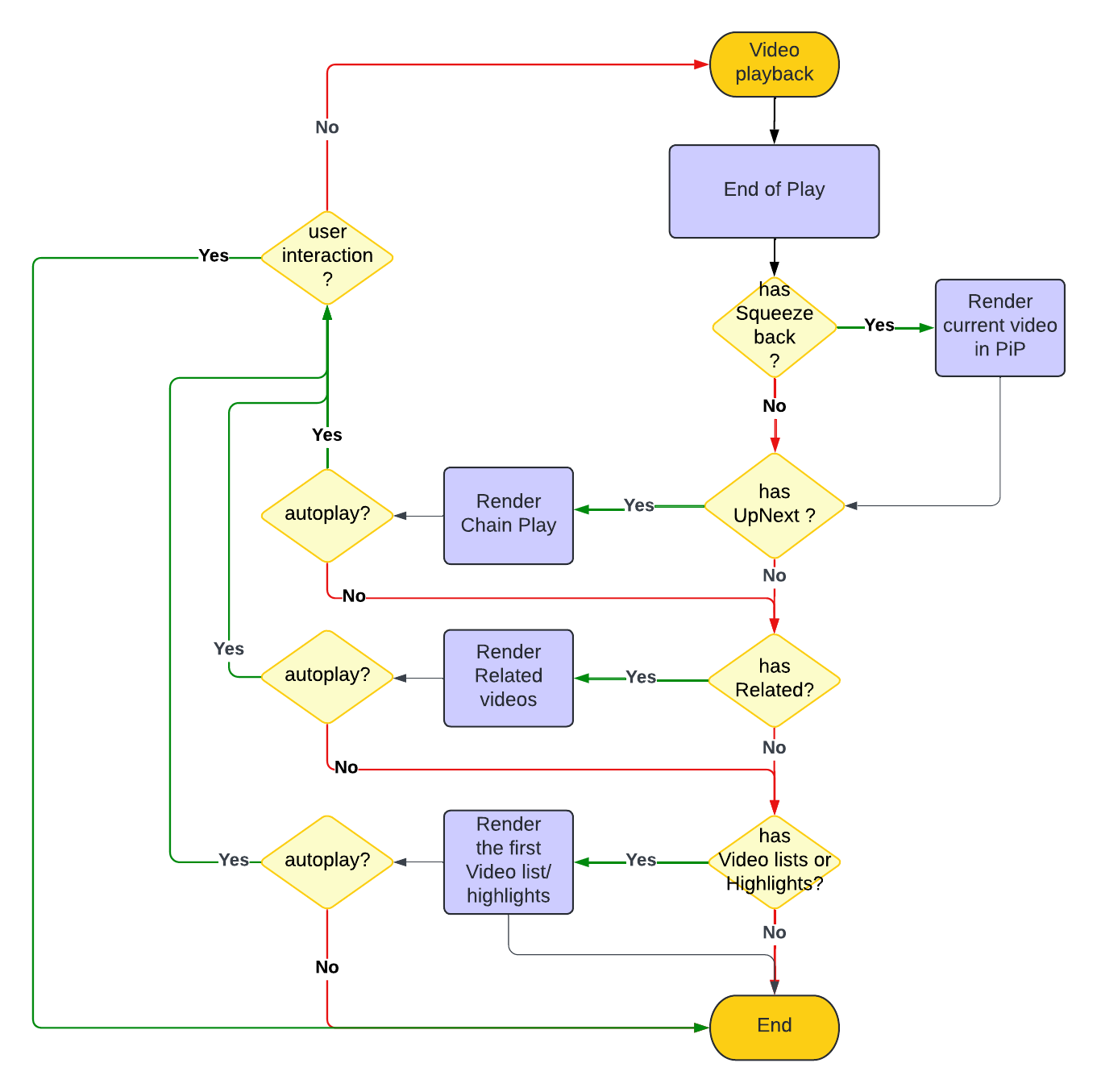
- Landscape mode and TV
Before starting
-
Ensure the DIVA Back Office instance you rely on is up and running.
-
Ask your video engineers team
<videoId>,<settingsURL>,<languageCountryCode>,<userToken>and<sharedKey>. -
According to your End-of-Play experience, ensure the VideoMetadata contains the End-of-Play properties for:
noteIn portrait mode the end of play contents will be shown below the video player. Tabs will be displayed in the bottom of the screen.
Instantiation
Write the Basic instantiation code. There's no additional code to write, unless you need to overwrite the autoplay behavior that the VideoMetadata contains.
End of play configuration
End of play screen content:
- Background image - loaded from image property.
- Title string - loaded from title property.
- SubTitle string - loaded from subtitle property.
- Replay button - Text read from Dictionary key [diva_eop_replay].
End of play screen is display:
- 5 seconds before video to finish or when.
- Squeeze back is enabled.
Working sample code for overwriting End Of Play data
Use the VideoMetadataManager extension to overwrite the End of Play data (and any other video metadata). This extension method uses BO adapter to get video metadata and exposes the result which can be altered before it gets passed to Diva Player. Below a sample code.
import DivaBOAdapter
import DivaCore
import DivaTVOS

extension VideoMetadataManager: @retroactive VideoMetadataProvider {
    public func requestVideoMetadata(
        videoId: String,
        currentVideoMetadata: DivaCore.SWVideoMetadataCleanModel?,
        playbackState: DivaCore.DivaModel.PlaybackState
    ) async throws -> DivaCore.SWVideoMetadataCleanModel {
        do {
            var videoMetadata = try await getVideoMetadata(
                videoId: videoId,
                isChromecastMode: false,
                isAirPlayActive: false
            )
            // you can modify the videoMetadata struct here
            videoMetadata.behaviour.endOfPlay.squeezeBackTime = 120_000
            return videoMetadata
        } catch let error as DivaModel.VideoMetadataProviderError {
            throw error
        } catch let error as VideoMetadataManager.VideoMetadataManagerError {
            throw DivaModel.VideoMetadataProviderError.other(message: error.description)
        } catch {
            throw error
        }
    }
}
Dictionary
Ensure the dictionary file contains the relevant keys.
Analytics events
Find here the available analytics events for the End of Play.